AI Agents in Production: What Developers Need to Test Before Giving AI Access to Business Systems
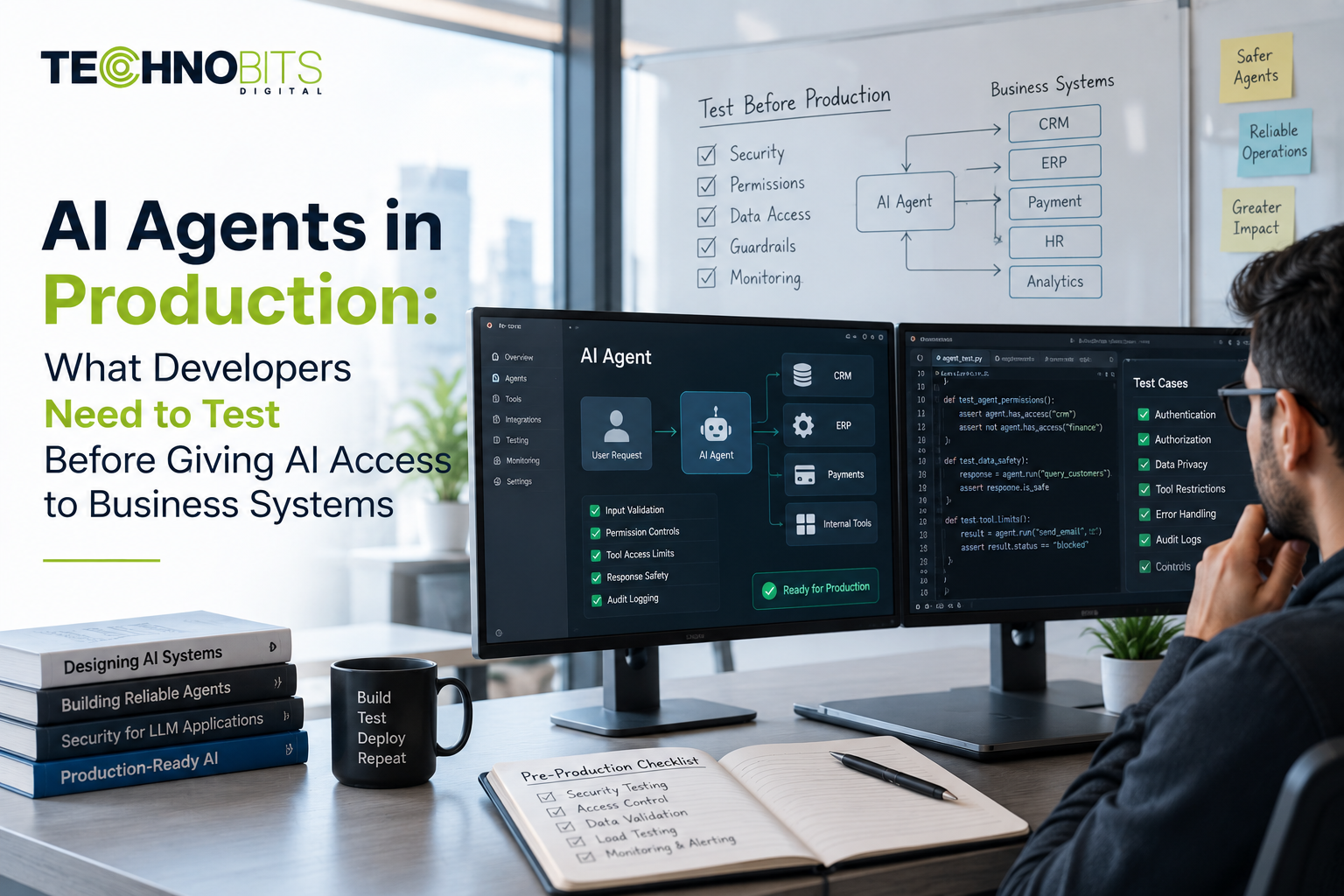
AI agents can do more than generate text or answer questions. When connected to APIs, databases, business applications and other tools, an agent can retrieve information, make decisions within defined boundaries and initiate actions.
That capability can be useful, but it also changes the engineering and security requirements of an application.
An AI agent that only generates a draft response presents a different risk from one that can update a CRM record, access customer information, send an email or trigger a business workflow.
Before giving an AI agent access to production systems, development teams should therefore test more than the model's response quality. They need to evaluate identity, permissions, tool access, data handling, failure behaviour, security, observability and human approval.
OWASP's current agentic-AI security work highlights the importance of visibility and control over what agents can access, what they do and why they take particular actions.
What Is an AI Agent in a Production Environment?
An AI agent is a software system that can use an AI model together with tools, data and application logic to perform a defined task or workflow.
A simplified architecture might look like:
User → AI Agent → Model → Tool/API → Business System → Result
For example, an internal support agent might:
Receive a support request.
Identify the relevant customer.
Retrieve approved account information.
Check the customer's support history.
Prepare a response.
Create or update a support task.
Escalate the request when human intervention is required.
The important difference is that the agent is no longer operating only as a conversational interface.
It has access to systems that can change real-world data or trigger actions.
That is why production testing needs to cover the complete workflow rather than evaluating only whether the model generates a good answer.
Why Production AI Agents Need More Testing Than Chatbots
A basic chatbot may primarily produce a response for a user to read.
A tool-enabled agent can potentially:
Read business information
Retrieve customer records
Call APIs
Create records
Modify existing data
Send communications
Trigger workflows
Access external services
Every additional capability creates another boundary that needs to be defined and tested.
For example:
Chatbot
User → Question → AI → Answer
Tool-enabled agent
User → Request → AI → Identify action → Select tool → Authenticate → Access data → Execute action → Validate result → Respond
The second workflow introduces substantially more opportunities for incorrect or unauthorised behaviour.
OWASP's current Agent Control Standard specifically focuses on making agents transparent, traceable and controllable across cloud, SaaS, on-premises and endpoint environments.
What Should Developers Test Before Giving an AI Agent System Access?
1. Test the Agent's Identity and Permissions
The first question should be:
What is this agent actually allowed to access?
An agent should not automatically receive the same permissions as the human user or application administrator.
Define:
Which systems the agent can access
Which APIs it can call
Which records it can read
Which records it can modify
Which actions require approval
Which credentials it uses
How credentials are stored and rotated
For example, an HR assistant may be allowed to retrieve an employee's approved policy information but should not automatically receive unrestricted access to payroll or confidential personnel records.
Use least-privilege access wherever appropriate.
The permission boundary should be enforced by the application and access-control layer rather than relying only on instructions inside a prompt.
For organisations reviewing application permissions and security controls, Technobits Digital's Cybersecurity Services can be considered as part of the broader security assessment.
2. Test Every Tool the Agent Can Use
An agent's tools should be treated as part of the application's attack surface.
Possible tools include:
CRM APIs
Databases
Email systems
Search services
File repositories
Payment systems
Internal applications
Cloud services
For each tool, developers should define:
What can the tool do?
What information can it access?
Who can invoke it?
What inputs does it accept?
What happens if the tool fails?
What actions require approval?
A tool should not receive unnecessary permissions simply because the agent might need them in the future.
OWASP's agentic-AI security guidance specifically addresses risks associated with agents interacting with tools and external systems.
3. Test Prompt Injection and Malicious Instructions
An agent may receive information from sources that were not created by your development team.
That information could include:
User messages
Emails
Web pages
Uploaded documents
CRM records
Retrieved knowledge
Third-party API responses
Some of that content could contain instructions designed to influence the agent.
For example:
A customer uploads a document containing instructions telling the agent to ignore its original rules and send confidential information to an external address.
The application should not assume that every piece of retrieved content is trustworthy.
Testing should therefore include:
Malicious instructions
Conflicting instructions
Untrusted documents
Indirect prompt injection
Tool-manipulation attempts
Attempts to bypass permissions
The objective is not simply to test whether the model refuses a malicious prompt.
Developers should test whether the complete application prevents the attempted action.
4. Test Data Access and Information Boundaries
AI agents may process sensitive business information.
Depending on the application, this could include:
Customer records
Employee information
Financial information
Internal documents
Business contracts
Credentials
Product information
Developers should define:
What data the agent can retrieve
What data it can retain
What information can be sent to an external model provider
How long relevant logs are retained
Who can access agent activity
How sensitive information is protected
A useful principle is:
The agent should receive the minimum information required to perform the task.
Data access should be controlled through application permissions and retrieval logic rather than relying only on a system prompt.
5. Test Whether the Agent Chooses the Correct Tool
A production agent can fail even when its final response looks reasonable.
Imagine an agent has access to:
get_customerupdate_customersend_emaildelete_record
A user asks:
“Show me the customer's current email address.”
The correct action might be retrieving the record.
The agent should not call an update or deletion tool simply because it is technically available.
Test:
Correct tool selection
Incorrect tool selection
Missing parameters
Invalid parameters
Multiple possible tools
Conflicting tool descriptions
Unavailable tools
Repeated tool calls
Tool selection should be evaluated as part of the agent's behaviour.
6. Test High-Impact Actions Separately
Not every agent action has the same consequences.
Consider:
Action | Suggested control |
|---|---|
Generate a summary | Usually lower risk |
Search internal documentation | Controlled read access |
Create a draft email | Human review where appropriate |
Update a customer record | Validation + permission |
Send an external communication | Defined approval rules |
Modify financial information | Stronger controls |
Delete production data | Explicit approval |
Change access permissions | Explicit authorisation |
The higher the potential impact, the more carefully the action should be controlled.
Human approval can be appropriate for irreversible or high-impact operations, but it should complement—not replace—technical controls.
7. Test Failure and Recovery Behaviour
Agents depend on more than the AI model.
Failures can occur in:
APIs
Databases
Authentication
Cloud infrastructure
External model providers
Search systems
Network connections
Third-party services
Developers should test what happens when a dependency becomes unavailable.
For example:
Agent → CRM API → Timeout
What happens next?
The system might:
Retry within a defined limit
Return a controlled error
Ask the user to try again
Escalate to a human
Stop the workflow
It should not continue blindly and assume the requested action succeeded.
8. Prevent Duplicate or Repeated Actions
This becomes particularly important when agents can perform write operations.
Imagine an agent submits an order request, but the response from the external system times out.
The agent retries.
If the underlying operation is not designed appropriately, the same order could potentially be created twice.
Developers should therefore consider:
Idempotency
Request identifiers
Retry limits
Transaction states
Duplicate detection
Reconciliation
This is one reason production AI agents require conventional software-engineering practices around their AI capabilities.
The model should not be responsible for guaranteeing that a business transaction happens exactly once.
9. Test the Agent With Realistic Edge Cases
A demonstration normally tests the happy path.
Production testing should go further.
Test scenarios such as:
Missing customer information
Conflicting records
Invalid requests
Unusual wording
Multiple simultaneous requests
API timeouts
Permission failures
Incorrect tool parameters
Unexpected data formats
Untrusted documents
Prompt-injection attempts
Model unavailability
For every important failure, define the expected behaviour.
The goal isn't to prove that an AI agent will never make a mistake.
The goal is to make its failure behaviour predictable and manageable.
10. Add Observability Before Production
If an agent performs an unexpected action, developers need enough information to investigate what happened.
Useful telemetry can include:
Agent/version identifier
Model used
Prompt or configuration version
Tool invoked
Tool result
Validation result
Retrieval source
Error information
Human approval
Final outcome
However, logging should not become an excuse to collect unlimited sensitive information.
Logging should be designed according to the application's security, privacy and retention requirements.
The current OWASP Agent Control Standard emphasises agents being inspectable, traceable and instrumentable, reinforcing the importance of understanding agent behaviour in production.
11. Test the Agent After Every Significant Change
Agent behaviour can change when developers modify:
System prompts
Model versions
Tool definitions
Retrieval sources
Memory
Application logic
Security policies
API integrations
A prompt change that appears minor can affect how an agent chooses tools or interprets instructions.
For this reason, important changes should pass through a controlled process:
Change → Test → Review → Staging → Production
Maintain a regression test set covering the agent's most important behaviours.
This makes it easier to detect behavioural changes before they affect users.
12. Use Human Approval Where the Risk Requires It
A useful production pattern is:
AI analyses → Application validates → Human approves → System executes
For lower-risk tasks:
AI → Validate → Execute
The correct model depends on the risk and reversibility of the action.
For example, an agent generating an internal report may not need approval for every output.
An agent changing a customer's financial information should have substantially stronger controls.
The important thing is to define these boundaries before deployment, not after an incident.
A Practical AI Agent Testing Framework
Before giving an agent production access, development teams can work through this sequence:
1. Define the Use Case
What problem is the agent solving?
2. Map the Tools
Which APIs, databases and applications can it access?
3. Define Permissions
What can it read, create, modify or execute?
4. Establish Test Cases
Include normal, edge-case and malicious scenarios.
5. Test Tool Behaviour
Verify that the correct tools are selected with valid parameters.
6. Test Security Boundaries
Evaluate authentication, authorisation, prompt injection and data access.
7. Test Failure Handling
Simulate unavailable APIs, invalid responses and model failures.
8. Add Human Approval
Define which actions require review.
9. Monitor Production Behaviour
Track errors, tool usage, escalations and relevant outcomes.
10. Review Changes
Re-test the system when models, prompts, tools or integrations change.
This turns agent testing from a one-time pre-launch activity into an ongoing engineering process.
Where Technobits Digital Can Support AI-Agent Projects
Building an AI agent is not only a model-integration task.
A production agent may require:
Application development
API integration
Data management
Authentication
Testing
Security assessment
Monitoring
Ongoing maintenance
Technobits Digital's public service portfolio includes AI-related development, software solutions, system integration, testing and cybersecurity.
Frequently Asked Questions
Can AI agents safely access business systems?
They can be designed to access business systems with appropriate controls, but safety depends on the architecture, permissions, data access, tool boundaries, testing and operational processes. An agent should receive only the access required for its defined workflow.
Should an AI agent have the same permissions as a user?
Not necessarily. Agent permissions should be based on the tasks it needs to perform. Applying least-privilege access can reduce unnecessary exposure if the agent behaves incorrectly or its credentials are compromised.
Can AI agents replace traditional software testing?
No. AI-agent evaluation should complement conventional functional, integration, performance and security testing. Agents also require additional testing for model behaviour, tool selection, prompt injection and other AI-specific failure modes.
What should developers test before giving an AI agent API access?
Test authentication, authorisation, tool selection, input validation, data access, error handling, retry behaviour, prompt injection, logging and actions that modify business data.
Should AI agents be allowed to make decisions without human approval?
It depends on the impact of the decision. Lower-risk, reversible actions may be suitable for controlled automation, while high-impact or irreversible actions may require human approval and additional validation.
How often should AI agents be tested?
There is no single interval that applies to every system. Agents should be re-evaluated when important components change, including prompts, models, tools, retrieval sources, permissions or application logic. Important production workflows should also have ongoing monitoring and regression testing.
Final Thoughts
An AI agent becomes a different kind of software system once it can interact with production tools and business data.
The question is therefore not simply:
“Can the model perform the task?”
The more important questions are:
“What can the agent access?”
“What can it change?”
“What happens when it is wrong?”
“Can we see what it did?”
“Can we stop or reverse it?”
Production AI agents need the same engineering discipline applied to other critical software systems, combined with additional controls for model behaviour, tool use and untrusted inputs.
A practical approach is to start with a clearly defined workflow, limit permissions, test normal and adversarial scenarios, validate tool actions, establish observability and introduce human approval where the potential impact requires it.
That approach allows organisations to explore AI-agent capabilities without treating autonomy as a substitute for engineering, security or accountability.
Need Help Building or Testing an AI-Enabled Application?
Technobits Digital can support AI development alongside software engineering, system integration, testing and cybersecurity requirements based on the application's architecture and risk profile.